Nextbase vs Nextbase
We compare the Nextbase and the Nextbase across every dimension that matters - our scores, the key specs, and how each performs on the things you will actually notice day to day.
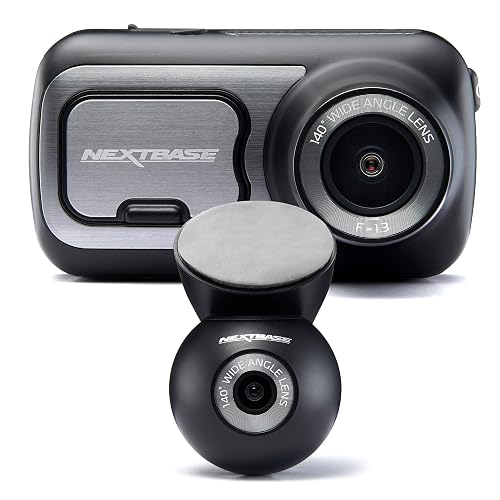

At a glance
| Nextbase | Nextbase | |
|---|---|---|
| Our score | 7.3/10 | 8.5/10 |
| Best for | Drivers wanting evidence and peace of mind, with front and rear cover and parking protection | Drivers wanting evidence and peace of mind and parking protection |
| Not ideal for | Anyone wanting a fully fit-and-forget device, since a microSD card and a little wiring are needed to get the best from it | Anyone wanting a fully fit-and-forget device, since a microSD card and a little wiring are needed to get the best from it |
| Brand | Nextbase | Nextbase |
Video Quality and Resolution
Nextbase
Video Quality and Resolution is a key factor for the Nextbase, as it records in both front and rear directions. The product title specifies 2K/1440p for the front camera, indicating higher detail on the road ahead than lower-resolution dash cams. For day-to-day clarity, sharpness in daylight should be checked separately from night performance, because night results depend on exposure and available lighting. Night vision is supported.
Nextbase
This dash cam records from the front in 1080p at 60fps, designed for smooth footage when vehicles are moving through traffic or along the road. With 60 frames per second, rapid scene changes should appear steadier, and motion blur is generally easier to manage. Night vision is supported. The dash cam's recording quality is at its best in daylight and predictable road motion, while fine detail in very dark settings cannot be precisely judged from the stated specifications.
Front and Rear Coverage
Nextbase
With dual front and rear cameras, the dash cam is designed to record both the road ahead and traffic behind while driving. The front camera captures the forward view, and the rear camera records traffic and hazards approaching from behind, which can be helpful after incidents or disputes. Footage can be reviewed on the 2.5-inch IPS touch screen. Coverage quality depends on the camera mounting positions and alignment before each journey. If the rear view is blocked by passengers or items, rear coverage will be reduced.
Nextbase
The Nextbase is designed for front-only recording, so it does not capture events happening behind the vehicle. That can be a limitation for parking incidents or when reviewing lane changes from the rear. In this setup, rear-side context relies on the car's mirrors and the driver's own observations, while the camera placement supports forward monitoring by recording what happens through the windscreen. If rear-facing footage is needed, a separate method such as an additional camera would be required. This results in a narrower evidence set than dual-camera systems, even when the front footage is clear.
Night Vision
Nextbase
Night vision on the Nextbase is designed to improve visibility in darker driving conditions, including at night and in low-light areas. In use, it aims to deliver clearer front and rear footage as light levels drop, making lane markings and surrounding traffic easier to spot earlier. The benefit is linked to the dual front and rear camera setup, with each direction recorded as conditions change. Performance will still depend on street lighting, weather, and headlight glare, which can reduce contrast. The strongest results are expected on darker roads, while extremely bright scenes may cause details to wash out.
Nextbase
Night vision on the dash cam is designed to improve what the front camera can record after dark. It is paired with a 1080p, 60fps front recording setup, aiming to provide clearer forward evidence when lighting is low. Night vision can help bring out lane markings, vehicle outlines, and street detail that would otherwise be harder to see. Performance depends on road lighting, vehicle speed, and how quickly the scene changes, with stronger results typically on darker but steady roads. Glare from headlights and reflections can reduce contrast. Night vision is front-only, so side and rear darkness is not addressed.
Parking Mode
Nextbase
Parking Mode on the dash cam is intended to record events while the car is not being actively driven. When enabled, it can capture footage during stationary time, so short disturbances may still be logged. Parking Mode behaviour is not described in the product title, so activation triggers and recording duration are unclear. Check the in-app settings before relying on Parking Mode for incident capture.
Nextbase
Parking Mode on the Nextbase is designed to keep the front dash cam recording while the car is parked, using the camera's front-only setup and built-in Intelligent Parking Mode features. When switched on, it aims to capture events that happen after the driver leaves, which can be useful for documenting impacts near the vehicle, vandalism, or incidents in the area. As recording is front-only, incidents on the sides or rear may be missed. Reviewers should test trigger performance before relying on it.
GPS and Speed Data
Nextbase
GPS and speed data are key features because they add location and timing context to dashcam footage, which supports incident review and clip sharing. On the Nextbase 422GW, built-in GPS can be used to check events against where they happened. Speed readings add further context by showing whether the vehicle was moving quickly or slowly at the time of impact. The dashcam records front and rear views even when GPS signal quality is poor, although location accuracy may be reduced. For best results on longer journeys, drivers should allow time for a clear GPS fix.
Nextbase
How useful is GPS and speed data in real-world driving with the dash cam? The unit includes built-in GPS with a stated 10Hz update rate, which supports frequent location logging. Since the speed data comes from GPS, it tracks road speed trends rather than wheel-based readings, so changes can appear during weaker satellite reception such as under heavy trees or near tall buildings. In everyday use, this GPS track supports location recall after incidents, and the higher update rate can make route lines look smoother.
Screen, App and Wi-Fi
Nextbase
How the dash cam is viewed and controlled matters, especially when footage needs quick checking after an incident. The Nextbase uses a 2.5-inch IPS touch screen, so menus and playback can be accessed directly in the car. It also supports Wi-Fi app connection, allowing users to view or manage recordings through a paired mobile app. Voice control can reduce screen tapping when hands are busy. For fast review, it helps to know where key options sit, as deeper settings may take more steps.
Nextbase
The dash cam's screen and connectivity are what make it practical day to day. The built-in 2.5-inch IPS touch screen lets the driver review recorded footage settings and recorded events without plugging into a computer, while key controls can be handled directly from the screen to reduce delays when checking an incident. For wider access, the Nextbase 322GW supports Wi-Fi for linking to a companion app. That means footage access can be more flexible for sharing or searching. Bluetooth and 10Hz GPS are also present, though their use is separate.
Installation and Ease of Use
Nextbase
Installing the dash cam is straightforward, but reliable recording depends on correct placement. The front and rear units must be mounted, and the cables routed neatly so they do not interfere with mirrors or controls. Built-in GPS performs best when the unit has a clear view of the road, and the 2.5-inch IPS touch screen helps confirm the initial setup. Voice control and app connection support the early settings, and parking mode can be enabled through the menu. A first test drive is important, because installation angle and positioning affect image coverage and the ability to identify key details.
Nextbase
Installation is straightforward, but it still takes some planning before the camera is ready for daily use. The Nextbase mounts using a magnetic mount, and it uses a front-only setup, so windscreen placement affects what is recorded. It includes a 2.5-inch IPS touch screen, which supports setup without needing extra apps. For quick configuration, the driver can connect via Wi-Fi and adjust settings in the companion app, although setup can take longer at first. Parking mode and GPS support automations, but they depend on correct positioning and power routing. Once configured, day-to-day operation feels simple.
Who Is This Dash Cam For?
Nextbase
This dash cam suits drivers who want front and rear coverage without setting up separate devices, and it is particularly useful for people who travel in mixed city and rural routes where incidents can occur from multiple directions. It also fits commuters who want reliable evidence for the road ahead and what happens behind, since it includes dual front and rear cameras. Built-in GPS and an app connection via Wi-Fi may make it easier to plan trips and review footage. The model also supports voice control and an IPS touchscreen.
Nextbase
The dash cam is aimed at drivers who want a front-facing dash cam with GPS and 1080p 60fps recording, alongside a setup that does not require constant adjustment. It suits people who mainly want to monitor what happens ahead on the road, because it is front-only. Phone control is supported via a Wi-Fi app connection, and the included 2.5-inch IPS touch screen enables in-car changes to settings. Parking mode and night vision are included to support longer periods of recording and darker commutes. Drivers who need a rear view may find the coverage limited.
Nextbase: pros
- 2K/1440p front recording
- Dual front and rear
- Built-in GPS stamps speed and location
- Parking mode watches the car while you are away
- Night vision for low-light driving
Cons
- A microSD card is often not included, so budget for a high-endurance one
- Parking mode usually needs a separate hardwire kit to power it with the engine off
- Fitting and tidy cable routing take a few minutes, and footage needs occasional clearing
Nextbase: pros
- 1080p front recording
- Built-in GPS stamps speed and location
- Parking mode watches the car while you are away
- Night vision for low-light driving
- Wi-Fi app for quick footage download
Cons
- A microSD card is often not included, so budget for a high-endurance one
- Parking mode usually needs a separate hardwire kit to power it with the engine off
- Fitting and tidy cable routing take a few minutes, and footage needs occasional clearing
Our verdict
Our pick is the Nextbase (our score 8.5/10) - A practical dash cam (1080p front, GPS) that captures clear evidence on the road for insurance and disputes. The Nextbase is still worth it if it is cheaper when you check, or if it better matches your specific needs.